
The app for dog trainers and training centers: manage your calendar, clients and lessons
Less time on spreadsheets and WhatsApp, more time training dogs.
Explore plans and start freeiOS & Android available now · Free + Premium with 7-day trial
Spending more time organizing than training?
Paper agendas, manual reminders, clients forgetting appointments, no visibility on progress... We know how frustrating it can be.
The solutionChaotic schedule
Appointments on paper, WhatsApp, scattered notes everywhere
Forgetful clients
Frequent no-shows because clients forget their lessons
Zero visibility
No way to track progress and revenue
Your phone does the work. You train.

New · AI Assistant PRO
The assistant that writes while you train.
The AI Assistant is an artificial intelligence assistant. Dictate notes during the lesson: it writes the lesson journal, drafts the message for the owner and, before the next lesson, reminds you where you left off with that dog.
- Works in 5 languages
- Try it free: 3 uses included
01 Before and during the lesson
You dictate, it takes notes
From 30 minutes before the lesson, open it and tap the microphone. Say what you see, when you see it: “Rex pulls on the leash at the gate”. Each note is saved with its time, and your eyes stay on the dog.
Group lessons and events: the same notes become a private debrief that prepares the next session.
Group lessons and events: the same notes become a private debrief that prepares the next session.
Time back
Notes, journal and report in a few seconds per lesson.
Eyes on the dog, not on the phone
Just talk: your voice becomes text.
Every owner kept in the loop
A clear message after each lesson, so clients see the value of the work you do together.
No progress forgotten
Every lesson stays in the history, and the briefing reminds you what matters.
You're always in charge
- Do I have to check what the AI writes?
- Yes. The AI can make mistakes, so you always review and edit before saving or sending. Nothing goes out without you.
- Is my clients' data safe?
- Is my voice recorded?
- Can I turn it off?
- Do I need it to use the app?
Free: 3 uses to try it. Premium: up to 900 uses a month per trainer, enough for the journal, report and briefing of about 10 lessons a day.
Each generation (journal, debrief, report or briefing) counts as one use. Failed attempts are not counted.
Features
Everything you need, in one app
Designed by trainers, for trainers
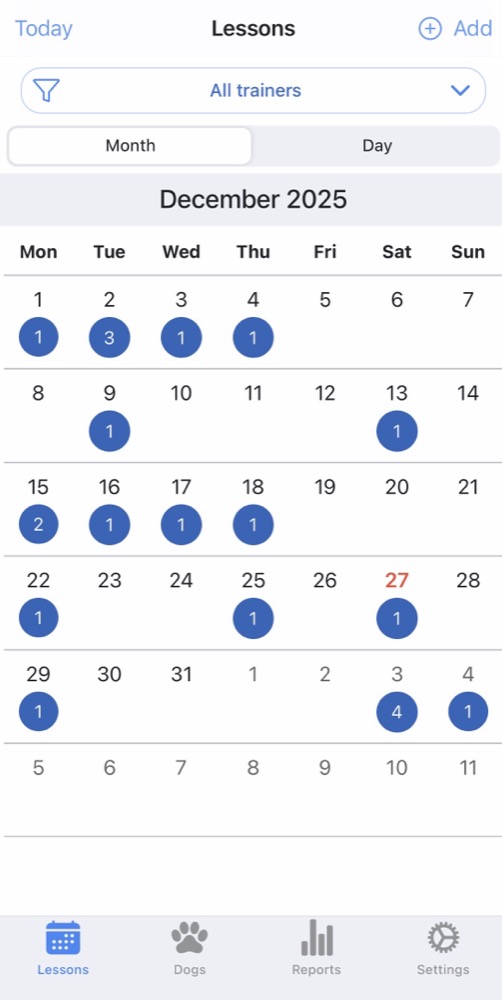
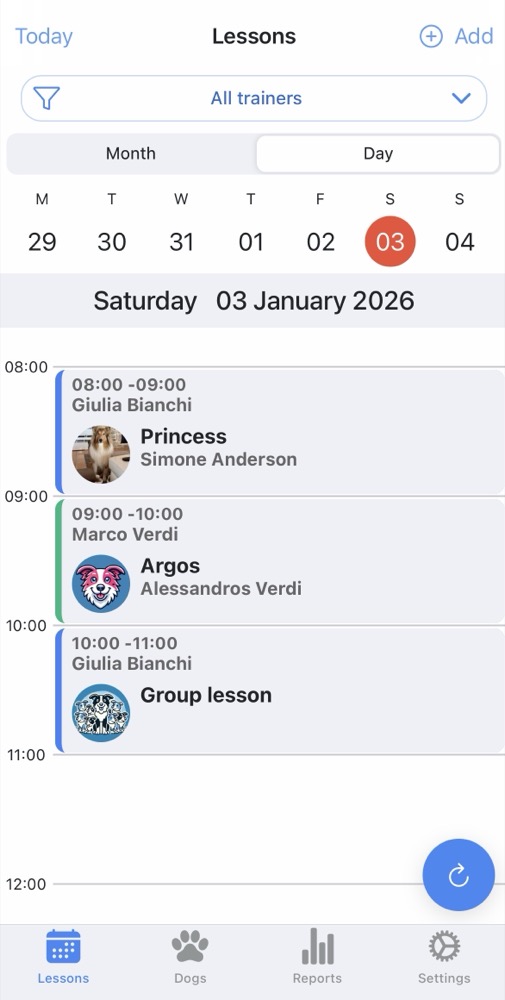
Smart Calendar
Plan dog training lessons at a glance. Daily and monthly calendar always in sync.
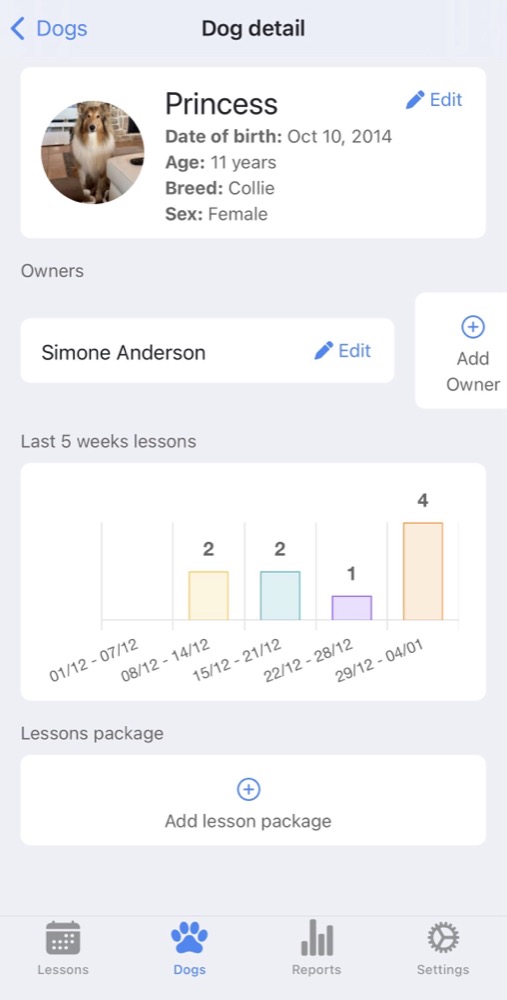
Complete Dog Profiles
Complete dog profiles with lesson history, owners and progress tracking. Up to 3 owners per dog.
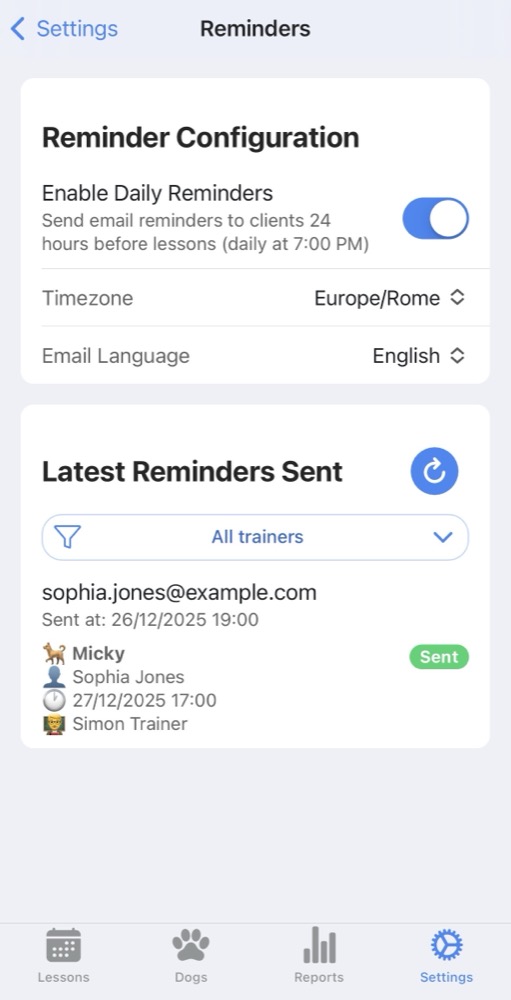
Automatic Reminders
Clients get emails 24h before. No more no-shows and useless calls.
Reports & Analytics
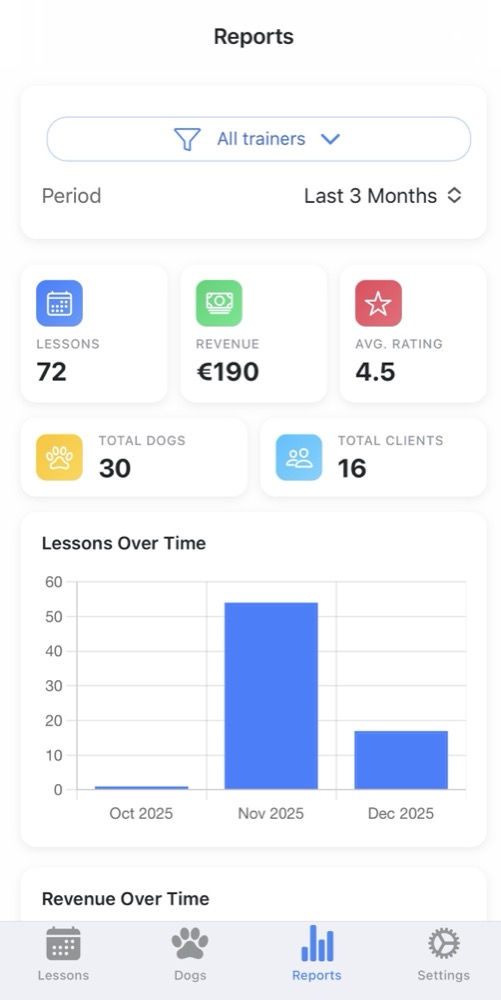
Dog training statistics in real time: lessons, revenue and average rating. Track your business performance with concrete data.
Lesson Packages
Create, sell and track lesson packages. All automatic with deadlines.
Team Collaboration
For centers with multiple trainers. Shared calendar and per-trainer reports.
iOS & Android App
Always in your pocket. Biometric login, take dog photos and import contacts from your phonebook.
Multi-language
Available in Italian, English, Spanish, German and French. Switch language with one tap.
Public events and public agenda: get found and fill your classes
With Premium you don't just manage the clients you already have: you find new ones. Mark a lesson as a public event, set how many spots are available and share the link (or the QR code) to your public agenda. Anyone who opens it sees your upcoming events and books a spot on their own.
Create the event
Mark a lesson as a public event and choose how many spots you want to open.
Share the link
Link and QR code live in Settings > Public agenda: post them on Instagram, WhatsApp, your website or flyers.
Collect sign-ups
People verify their email to book. You get an email for every sign-up and manage everyone from the lesson details.
Every new contact can be linked to an existing client or saved as a new one in a tap: sign-ups turn into real clients, not names on a sheet.
Go Premium and open your public agendaBenefits
Benefits designed for you
Whether you're an independent trainer or manage a center, DogTrainerPro adapts to your needs
Save time
Always synced calendar, automatic client reminders, dog profiles accessible anywhere. Spend more time training, less time organizing.
More professional
Dedicated app instead of scattered WhatsApp messages. Professional reports to show clients. Progress tracking with ratings.
Always organized
All clients in one place. Lesson packages with automatic deadlines. Complete history for every dog.
Access anywhere
Mobile app always in your pocket. Quick login with fingerprint or face. Take dog photos directly from the app.
Plans
Start free. Upgrade to Premium when you’re ready.
Try DogTrainerPro with no credit card and no time limit. When you're ready to work at full capacity, upgrade to Premium.
Try it free
Free
€0The core features to try the app with your first clients, free and with no expiry.
- Up to 5 dogs managed
- Up to 30 lessons scheduled
- Calendar, clients, lesson history and reminders
- 3 AI Assistant uses to try it
- ✗ Collaboration with other trainers
- ✗ Public agenda and events with online sign-ups
Free forever, no commitment
The limits are designed for evaluation, not for running a full business. When you're ready, upgrade to Premium.
Recommended for full-time trainers
Premium
Work without limits, as a team, and fill your agenda with new clients.
7 days free, then a monthly subscription. Pays for itself with a single lesson a month.
See the exact price in your currency in the app, before you confirm.
No limits
Unlimited dogs, clients and lessons.
On Free: 5 dogs · 30 lessons
Work as a team
Invite other trainers: share dogs, clients and calendar in one structure.
Find new clients
Public agenda and events with link and QR code: collect online sign-ups.
AI Assistant
NewUp to 900 uses a month per trainer.
On Free: 3 trial uses
Try Premium free for 7 days
No charge for the first 7 days · cancel before and you pay nothing
Cancel anytime · Premium features are marked PRO in the app
Payment is charged to your store account when the trial ends. Subscription auto-renews unless cancelled at least 24 hours before the renewal date.
Download the app and start free
Available on iOS and Android. Upgrade to Premium anytime, right inside the app.
Free plan free forever, no credit card · 7-day Premium trial with no charge
FAQ
Frequently asked questions
The app
AI Assistant
Plans and pricing
Teams and public events
Have more questions?
Contact us